
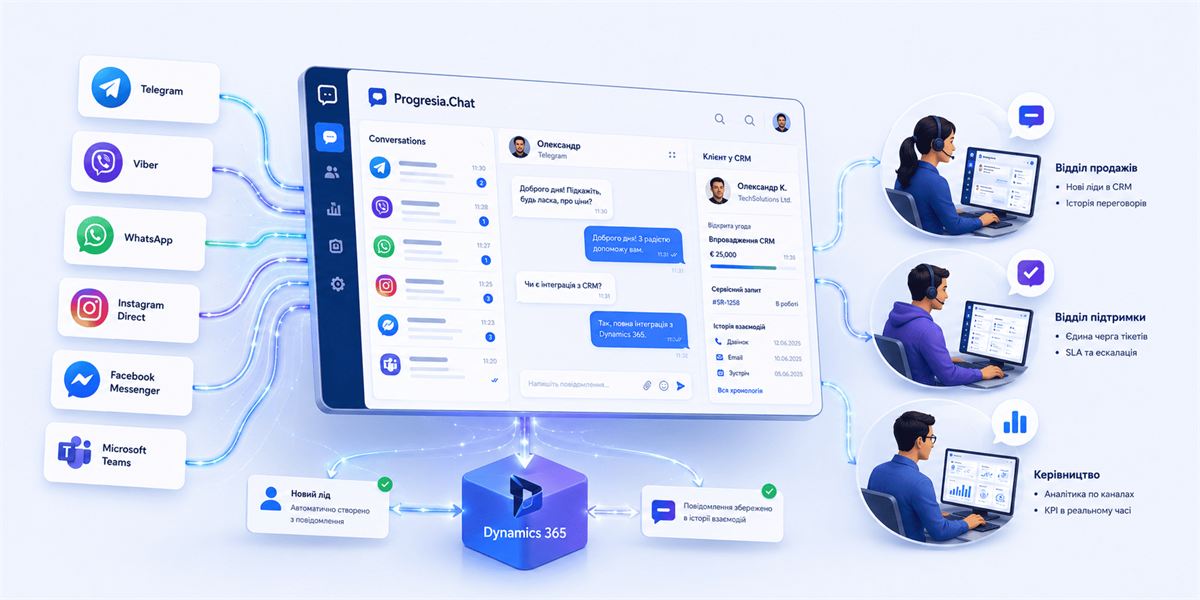
Progresia.Chat: Omnichannel Platform for Sales and Support Teams
A client messages on Telegram, then Viber, then comments on Instagram. Your manager switches between tabs, trying to figure out who this is and whether you've spoken before. Some messages get lost. The client goes to a competitor.
Supported Channels
Telegram
Bots, group chats, and direct messages — all routed to one queue.
Viber
Popular across B2C and regional markets in Eastern Europe.
WhatsApp Business
For international clients and cross-border partners.
Instagram Direct
Direct messages and post comments captured in one queue.
Facebook Messenger
Page conversations handled from the same interface.
Microsoft Teams
Internal requests from colleagues and partners — same workspace.
How Progresia.Chat Integrates with Dynamics 365
CRM integration with messengers is the core advantage of Progresia.Chat over standard chat aggregators. Every incoming message is automatically:
- Matched to an existing contact or company in Dynamics 365
- If no contact exists — a new lead is created
- Attached to the relevant deal or service request card
- Logged in the interaction timeline alongside calls and emails
Which Teams Benefit Most
Sales
Sales Teams
- Negotiate through any channel with full CRM history
- Complete conversation history when transferring a client
- New leads from messengers go straight into the pipeline
Service
Support Teams
- Requests from Telegram, Viber, Instagram — one unified ticket queue
- SLA timers and escalation in a single platform
- Automatic routing between operators
Scale
High-Volume Operations
- 50+ daily inquiries — full visibility and control
- Real-time operator workload monitoring
- Channel-level analytics in Power BI
How Progresia.Chat Compares to Other Solutions
| Chat Aggregator | CRM with Basic Chat | Progresia.Chat | |
|---|---|---|---|
| All messengers | Yes | Partial | Yes |
| CRM integration | None or weak | Basic | Native Dynamics 365 |
| Analytics | Basic | Limited | Full Power BI |
| Custom business logic | No | No | Via Power Automate |
| SLA and escalation | No | Partial | Yes |
Technical Requirements and Launch Timeline
Frequently Asked Questions
What's the difference between omnichannel and multichannel?
Multichannel means clients can reach you through multiple channels. Omnichannel means all those channels are connected — and you see a single, unified client history. Progresia.Chat is truly omnichannel: managers see Telegram, Viber in one place.
How many operators can work simultaneously?
There's no hard limit — scale is determined by your Dynamics 365 licenses. The platform works equally well for a 3-person team or a contact centre with 100+ agents.
What happens to messages when an operator is offline?
Messages go into the shared queue and are assigned to the next available operator. You can configure auto-replies, schedule-based routing, and escalation rules — all through Power Automate.
Related reading
Want to see Progresia.Chat in action?
We'll run a demo using your example — showing how integration with your current channels and CRM looks in practice.