
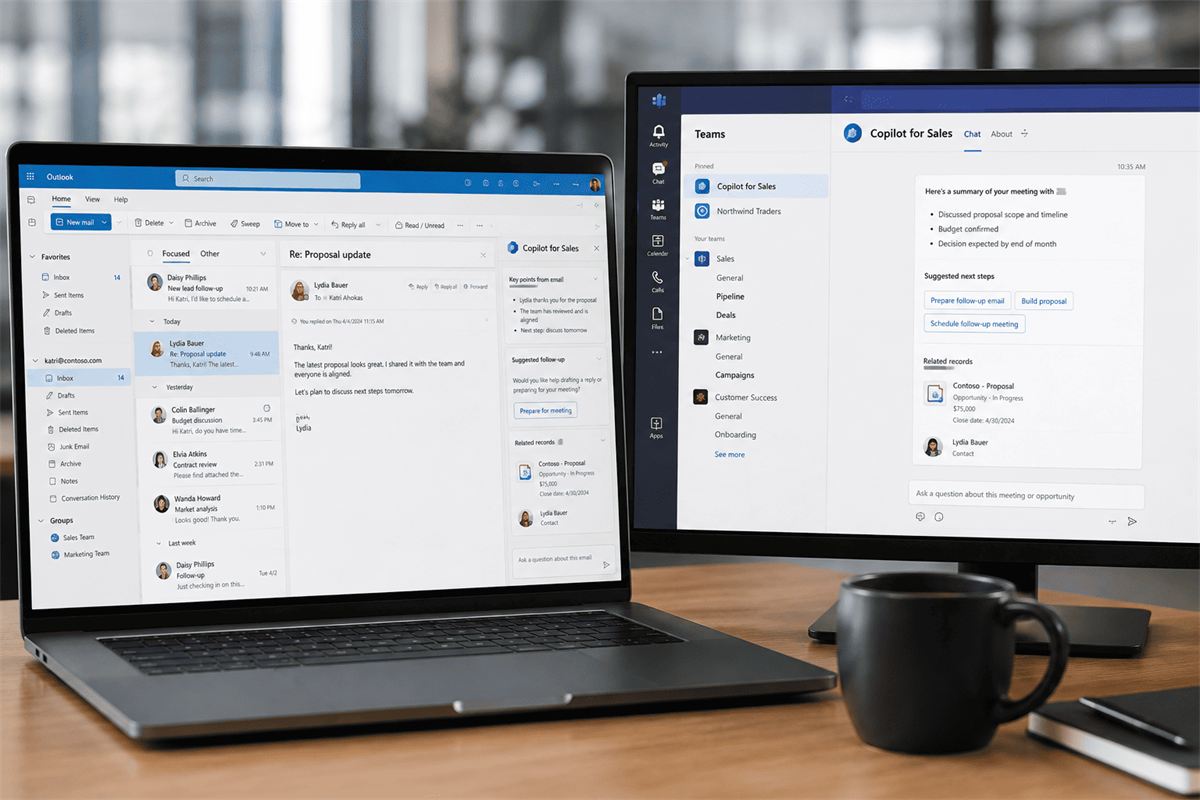
Copilot for Sales: an AI assistant in Outlook and Teams for sales reps
Copilot for Sales is a separate license that connects Outlook and Teams to Dynamics 365 Sales (or another CRM) data, so a rep sees customer history right inside an email or a meeting, and the CRM gets updated without manually filling out a record after every call.
The problem Copilot for Sales solves
A typical sales rep spends their day in email and calls, not inside the CRM itself. A customer record gets updated late, call details get logged "later, if there's time" — and often never get logged at all. When a rep leaves the company or goes on vacation, whoever picks up the deal starts almost from zero, because the real context lived in that person's head, not in the system.
Copilot for Sales solves this not with a new requirement to "fill out the CRM more diligently," but by moving the needed information from CRM into email and meetings, and back — without manually switching between windows.
What a rep actually sees
Customer context right inside an Outlook email
Opening an email from a customer, a rep immediately sees a side panel with CRM data: deal stage, recent contacts, open tasks — no switching to a separate system.
Call preparation
Before a meeting, Copilot builds a short brief: deal history, prior agreements, open customer questions — so there's no need to scroll through email threads ten minutes before a call.
Meeting summary in Teams
After a call, Copilot generates a text summary of the conversation and a list of agreed next steps. The rep just needs to review and confirm it instead of writing notes from scratch.
CRM updates with a suggestion
Based on the meeting summary, Copilot suggests updating the deal record in Dynamics 365 Sales: stage, next step, note. The rep confirms with one click instead of typing it all manually.
How this differs from the general Dynamics 365 Copilot
Dynamics 365 Copilot is a broader AI layer inside the CRM itself: deal analysis, recommendations, content generation for marketing campaigns, and work across finance and service modules. Copilot for Sales is a narrower license focused specifically on connecting Outlook and Teams to sales data, for teams whose day-to-day work happens mostly in email and meetings rather than the CRM's web interface.
In practice, some teams use both: Copilot for Sales for a rep's daily work with email and calls, and the broader Dynamics 365 Copilot capabilities for the sales manager and pipeline-wide analytics. See the sales module overview on the Dynamics 365 page. For a comparison against plain ChatGPT, see Microsoft Copilot vs ChatGPT for business.
What's needed to launch it
- CRM: Dynamics 365 Sales or Salesforce with an active integration
- Licenses: Microsoft 365 Copilot for baseline access plus a separate Copilot for Sales license
- CRM data: an up-to-date deal, pipeline-stage, and contact structure — Copilot's suggestions are based on what's already in the system
- Access-rights setup: Copilot only shows data a given rep already has access to in the CRM
The real payoff for a sales team
The biggest time savings aren't in writing emails per se, but in call preparation and in how up to date the CRM stays. When updating a record takes one click instead of five minutes of manual typing, reps do it more often, and a manager gets an accurate view of the pipeline instead of two-week-old data.
Frequently asked questions
Do you need a separate Dynamics 365 to use Copilot for Sales?
Copilot for Sales works with Dynamics 365 Sales and also supports integration with Salesforce for companies that haven't moved to Microsoft CRM yet.
Does Copilot for Sales see customer emails outside the CRM?
Copilot analyzes the email a rep has open in their own Outlook, within their access rights. Data doesn't leave the company's Microsoft 365 tenant and isn't used to train general AI models.
How long does rollout take for a sales team?
If the CRM is already set up with structured data, connecting Copilot for Sales for a team usually takes a few days. Most of the time goes not into technical setup but into short training on new workflows for reps.
Want to see what Copilot for Sales looks like in your Outlook?
We'll show a demo built around your actual deal structure in Dynamics 365 Sales.